
Have you ever wondered how to subscribe Snapchat Plus and unlock exciting features that could elevate your social media game? This Snapchat premium subscription offers unique perks like custom themes, Snapchat planets, and story boosts that make your interactions stand out.
With a price tag starting at just $3.99 per month in the U.S., you might be surprised at how affordable it is to enhance your Snapchat experience.
In this guide, we’ll walk you through the steps to subscribe and make the most of these captivating Snap planets!
What Is Snapchat Plus?
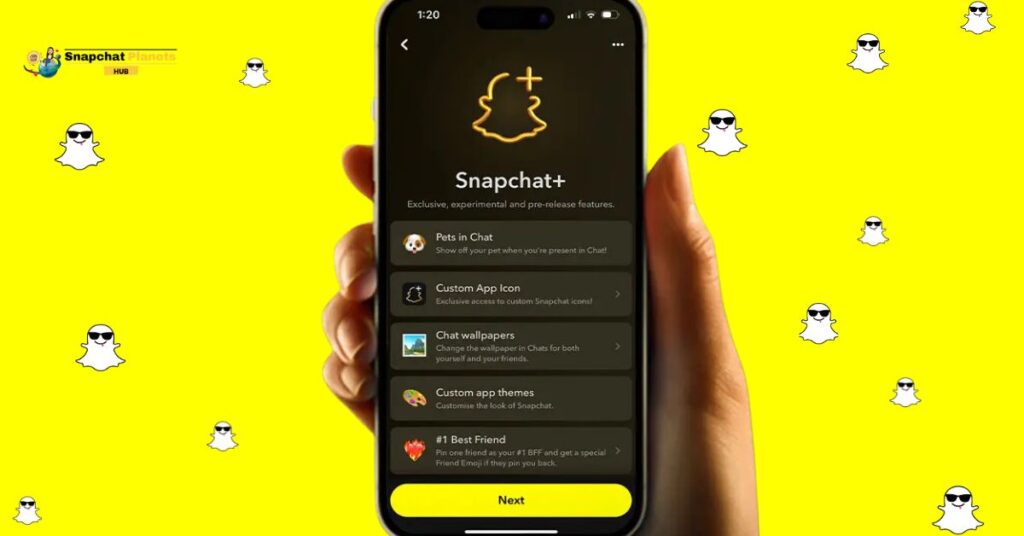
Snapchat Plus is a paid subscription that unlocks a range of special features not found in the free version, priced at about $3.99 per month in the US, though costs may vary by country. If you have Snapchat Plus, you can access these features:
- Customization: You can change your app with custom icons and themes.
- Friend Solar System: This feature shows your place in your friends’ circles so you can see your social connections.
- Priority Replies: Your messages get noticed faster, helping you stay connected in busy chats.
- Exclusive Badges: You can display your Snapchat+ status to stand out.
- Story Boost: This feature makes your stories more visible to more people, perfect for sharing moments or growing your audience.
Snapchat Plus improves your social experience and helps you show your unique style in a fun way.
Snapchat Plus Pricing
Snapchat Plus has a subscription model with different prices in each country.
- In the U.S. and the U.K., the monthly fee is $3.99 or £3.99.
Users can save more with longer plans:
- Six months for $21.99 or £21.99
- One year for $39.99 or £39.99
Prices may change over time. Users in some countries may have different rates so to buy snapchat account, check the rates.
How To Subscribe Snapchat Plus (Step-By-Step)
Once you’ve launched Snapchat and logged into your account, accessing your profile is the key to unlocking Snapchat++.
- Tap your Bitmoji or profile icon in the top-left corner to access your profile.
- Go to the ⚙️ Settings icon in the top-right corner.
- Scroll down to find and tap “Snapchat+” to view subscription plans.
- Options include monthly, 6-month, and yearly plans.
- Choose a plan that suits you and hit “Subscribe.”
- You might get a 7-day free trial to try exclusive features.
- Enter your payment details (Apple Pay, Google Pay, or credit card) to complete the process
How to Cancel Snapchat Plus Subscription
If you ever decide to cancel your subscription, the process is equally simple.

For iPhone Users:
- Go to Settings and tap your Apple ID.
- Navigate to Subscriptions and find Snapchat+.
- Tap “Cancel Subscription.”
For Android Users:
- Open Google Play Store and tap your profile icon.
- Go to Payments & Subscriptions and select Snapchat+.
- Tap to cancel your subscription.
Canceling stops auto-renewal, but you’ll keep access to snapchat plus features until the end of your billing cycle.
How to Get a Refund for Snapchat+
Navigating the world of refunds can be tricky, especially for subscription services like Snapchat+. While Snapchat doesn’t offer direct refunds for their subscriptions, there are pathways you can explore.
For Android users:
- Go to the Google Play Refund Page.
- Fill in your purchase details and reason for the refund.
For iPhone users:
- Visit the Apple Refund Page.
- Sign in, select “Request a Refund,” and follow the easy steps.
To improve your chances of getting a refund, cancel your subscription soon after payment.
Read More: How To Remove My Ai On Snapchat | A Step-By-Step Guide
Conclusion
Subscribing to Snapchat Plus opens up a range of exciting features that enhance your experience on the app. By following the clear steps highlighted in the guide on how to subscribe Snapchat Plus, you can unlock special tools and enjoy content like never before.
Remember to check for any updates and pricing changes to get the most out of your subscription. This new experience can truly elevate your social media interactions. Don’t miss out, take the plunge and enjoy all that Snapchat Plus has to offer today!
FAQs
How Much Is Snapchat Plus?
Snapchat Plus costs around $3.99 per month. Prices may vary slightly depending on your location.
How can I Subscribe to Snapchat Plus?
You can subscribe to Snapchat Plus by opening the Snapchat app, tapping on your profile icon, selecting “Snapchat Plus,” and then following the prompts to complete your subscription.
Why Can’t I Subscribe to Snapchat+?
If you can’t subscribe to Snapchat Plus, it may be due to regional restrictions, age limitations, or issues with your payment method. Ensure your app is updated and try again.
What is The ✪ on Snapchat?
The ✪ symbol indicates that a user is subscribed to Snapchat Plus, granting them access to exclusive features and a customizable experience.
How do I Pay for Snap+?
Payments for Snapchat Plus can be made through in-app purchases using your linked payment method, such as credit/debit cards or mobile payment services.